For design engineers, CNC machinists, and quality inspectors engaged in precision manufacturing, the ability to interpret engineering drawings correctly is a key competency.
An engineering drawing is not merely a decorative representation of an object; it is a technical document that specifies the measurements, tolerances, material properties, surface finishes, and inspection requirements for a part. While a CAD model shows the exterior of a part produced by machinery, an engineering drawing tells the machinist how that part should be made and how it must be inspected. A single error in reading a tolerance value or symbol can lead to scrapping the part, the assembly failing, or incurring high reworking costs.
This guide explains in detail the step-by-step process for properly reading an engineering drawing, title block, orthographic views, dimensional conventions, GD&T symbols, and production notes.
Why Reading Engineering Drawings Correctly Matters
Every dimension present in an Engineering drawing has a direct impact on how the item is manufactured. Bore diameter determines what operation a Machinist will be using; position tolerance determines whether or not the part can be machined using a fixture or whether it can be machined using a standard 3-axis setup; surface roughness callout provides an indication of whether that face should require a secondary grind or polish after milling.
Engineers who know how to read an Engineering drawing well prevent ambiguity before it reaches the shop floor, thereby reducing lead time and first-article rejection rate by getting this information to manufacturing shops sooner.
How Engineering Drawing Relates to the CAD Model?
It is important to know how an engineering drawing relates to the CAD model from which it was created. The CAD model determines a part’s nominal 3D geometry; however, the model does not completely communicate any allowable variation, required surface conditions, and/or inspection criteria unless combined with corresponding engineering drawings. The engineering drawing would provide that information.
A pocket that may seem simple when looking at the CAD model may actually have a flatness requirement for its bottom surface or be referencing a specific datum on the engineering drawing and not shown on the CAD model. By reviewing both the CAD model and the engineering drawing together before any tooling or setup decisions are made, design engineers can identify these tolerances before they have an impact on manufacturing.
How to Read Engineering Drawings?
Step 1: Start with the Title Block
First, before studying geometry, look at the title block at the bottom left corner of the sheet. It anchors all dimensions that will follow:
| Title Block Element | What It Confirms |
| Drawing number and revision | Ensures you are working from the current, approved version |
| Material specification | Identifies alloy or grade, which affects machinability and tooling |
| Units (mm or inches) | Prevents misreading dimensions by a factor of 25.4 |
| Scale | Confirms whether the drawing is full-size, reduced, or enlarged |
| Default tolerance block | Sets the allowable variation for any dimension without an explicit tolerance |
The single biggest reason for avoidable mistakes in manufacturing is not including the title block. A part made from an old revision is a completely different part from the same part made from a new revision.
Step 2: Interpret Drawing Views Correctly
To provide a geometric definition of the part in a fixed orientation from a viewing angle, the orthographic (top/front, sides) views create three-dimensional views of the part that can assist in understanding where pockets, bosses, and angled surfaces exist. Two projection systems dictate the arrangement of the various views; the third-angle systems used in ASME drawings are used extensively throughout North America, and the first-angle systems commonly found in ISO drawings are used primarily throughout Europe and much of Asia. Confusion between third- and first-angle projections could cause you to determine where a particular feature is incorrectly.
Section views cut into the part to show features that cannot be seen when viewing from the exterior (counter bores, wall thickness). Detail views enlarge a very small area, such as fillet radius or thread relief (which will not be readable), to give you clarity at the drawing’s main scale. It is critical to see all views at once to ensure that you are not missing any dimension by looking at just one whitepaper.
Step 3: Decode Dimensions and Tolerances
Dimensions define size and position, and tolerances define the permitted amount of variation. Both dimensions and tolerances are necessary to select the proper process.
| Callout | Meaning | Manufacturing Implication |
| 25.00 ± 0.05 mm | Linear dimension with bilateral tolerance | Standard milling or turning typically holds this range |
| Ø12 H7 | Precision hole fit class | Requires reaming or precision boring, not standard drilling |
| Ø8 THRU | Through hole | Hole passes through full material thickness |
| 10.00–10.05 mm | Limit dimensioning | Defines the acceptable measurement range directly |
| ± 0.01 mm | Tight tolerance | May require CNC turning/grinding and CMM inspection |
Manufacturers mark all tolerances <+/- 0.02 mm for additional consideration during bidding because of the added time for production due to the increased cycle time and added cost for inspection associated with tighter tolerances.
Step 4: Recognize GD&T and Common Symbols
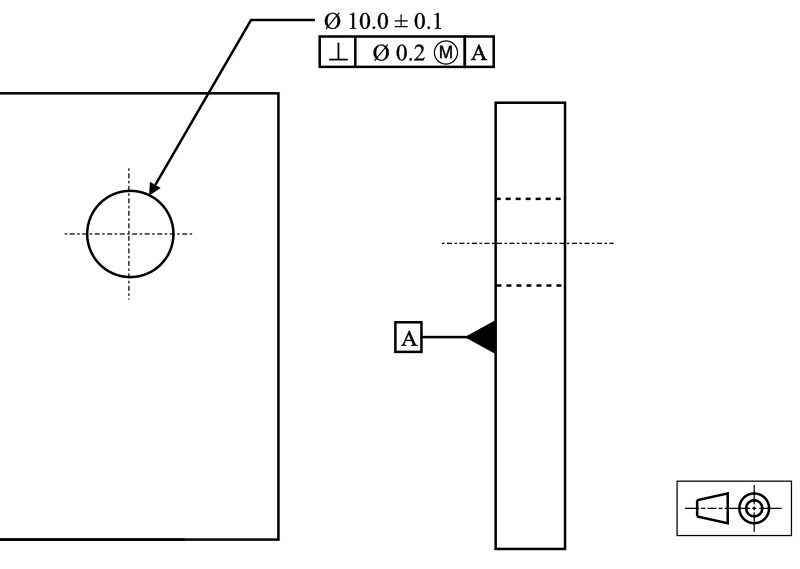
There is a standard worldwide used for GD&T called ASME Y14.5 (United States) or ISO 1101 (International), which standardizes the control of form, orientation, and location, independent of the size of this form. Misinterpretation of a dimensional symbol is one of the most common errors made in the manufacturing process. It typically occurs when two features have different tolerance requirements, but both are referenced using a size tolerance instead of a positional tolerance.
| Symbol / Callout | Category | Practical Use |
| Position Ø0.10 | A | B | C | Location | Controls a hole’s location relative to datums A, B, and C |
| Flatness 0.03 | Form | Limits surface variation independent of size |
| Parallelism 0.02 | Orientation | Ensures two surfaces remain aligned within range |
| Ra 1.6 µm | Surface finish | Specifies roughness for sealing or mating surfaces |
| M8 × 1.25 | Thread callout | Metric thread, 8 mm major diameter, 1.25 mm pitch |
Even if a component satisfies the diameter requirements, it could fail inspection because the axis of this component lies outside of the positional tolerance zone established in relation to the models of reference. Therefore, in a 2D view, datums or reference surfaces for measurement must be determined early on in the drawing review since they should not be secondary in nature.
Step 5: Review Notes, Materials, and Finish Callouts
General notes, which are typically located close to the title block, indicate general requirements for an entire part, such as heat treatment, plating or anodizing, and deburring instructions, and any certification requirements. In general, these notes are located outside the primary view and can easily be missed; however, failing to reference the heat treatment callouts can cause the hardness of the part to change sufficiently to affect machinability for any future rework operation.
Common Mistakes When Reading Engineering Drawings
Misreading the View
Using the wrong view to locate a feature is a common mistake that leads to holes or pockets being placed incorrectly during programming. For example, the dimension may be for the front view, but the actual location of that feature comes from the side view; as a result, the feature is shifted in a direction that can be hard to discover until the part has been processed.
Ignoring the Default Tolerance Block
Not all dimensions will show an explicit tolerance. However, if there is no tolerance shown, the default tolerance block in the title area applies. Therefore, if there is no tolerance in the dimension, engineering personnel often assume, incorrectly, that no tolerance is required, rather than assuming the standard tolerance applies.
Confusing Size and Geometric Tolerances
A size tolerance (-12mm + 0.05mm) only confines the range of how large or small a feature can be. In contrast, a geometric tolerance defines where that feature is positioned and/or how accurately it is created and is not dependent on size. A hole may have perfect establishment of its size, but it could be rejected as it may not sit within the allowable tolerance zone.
Overlooking Finish and Heat-Treatment Notes
It is very common that general notes applied outside of the primary view will be overlooked. Frequently, these general notes contain instructions for: heat treatment, plating, and/or deburring. Often, missing a heat treatment callout results in machining to the incorrect hardness before a rework operation.
Working from an Outdated Revision
If the title block is ignored when the drawing is reviewed, then there is no verification of the current revision letter for the artwork. Parts that have been machined to supersede drawings are treated as different parts, even if the visual aspect appears to be the same.
Applying This in Precision Manufacturing
CNC Machining
Drawings are used to interpret parts, which determine how to fixture the part, the type of tooling required for machining the part, and what operations will be completed on the part in what order. For example, when creating a bore to H7 and a 10mm bore diameter, and a flatness callout on the front of the part, there will be different fixturing requirements than a part that only has general tolerances. When a datum structure is tied to multiple features on the same datum structure, this often indicates that the part needs to be machined in one fixturing, or the same fixturing will be used to fixture the part between operations to avoid stacking errors between the features.
Laser Cutting and Sheet Metal Fabrication
Here, the focus is on the thickness of material when cutting, how much kerf will be left in the part after cutting, where the bends for the bend lines will need to be located, and how flat the part will remain after being cut. Because the heat from cutting and how much material will spring back after cutting will both indirectly affect the final dimension of the part, a drawing will usually call out flatness on the laser-cut blank and may require the part to be leveled again before being formed.
Why This Matters Before Quoting?
Being able to read an engineering drawing accurately before quoting will eliminate scope changes mid-production, correctly identify tolerance-critical features for inspection, and provide the quoting team with accurate information concerning cycle time and cost drivers before the job is scheduled.
Conclusion
Successful reading of engineering drawings comes from adhering to a consistent process: verify the title block and revision level; review all views together, decipher dimensions and tolerances, interpret GD&T symbols in relationship to datum reference points, and finally examine notes before developing a process plan. Manufacturers who use this sequence will identify ambiguities earlier, reduce first-article rejections, and maintain the schedule of tolerance-critical components.
Before any manufacturing process, our engineering group at Premium Parts carefully inspects your drawings in terms of the date they were created, as well as any tolerances, finishes, and notes related to those drawings. Therefore, every part that you receive will always match the drawing. As soon as you provide us with your engineering drawings or CAD files, we will give you an estimate of the cost for precision CNC machining or laser cutting based on your specific requirements regarding tolerances and finishes.
FAQ
Q: What is the first thing to check when reading an engineering drawing?
Verify that you are looking at an up-to-date revision when assessing the various geometries of a given piece of work; the best way to confirm this is to begin with the title block and check the revision level, material, units, and default tolerance block. Using any other part of the sheet before confirming the revision level is one of the most significant causes of manufacturing errors.
Q: What’s the difference between a dimension and a GD&T tolerance?
A dimension of a part will define the size of the part. A GD&T dimension will define the location of the part and the form of the part independently of the size. A GD&T dimension will be established for a location or form of a part. Therefore, a part may have met the size dimensions of the part and still will not pass inspection if the tolerances of the GD&T dimension have not.
Q: Why does the projection angle matter when reading drawings?
The projection angle has a significant impact on how views are shown on a drawing. Each view is shown differently because of the different projection angles (1st or 3rd). If a projection angle is misread, then two or more views of the same feature could appear to be in incorrect positions. This could lead to a part being machined or assembled in the wrong orientation.
Q: How do tolerances affect manufacturing cost and lead time?
More precise tolerances can result in longer machining times, added setups, or some form of CMM inspection, which will result in increased cost and lead time. If the tolerances are less than about ±0.02 mm, the manufacturers will often highlight them for additional review during quoting.