When a CNC quote takes a week instead of a day, engineers tend to blame the shop. However, most of these delays in fact begin on the buyer’s side, before a supplier even opens the file. A missing tolerance, vague material callout, or CAD file with no drawing makes the quoting team stop and ask questions, not just run the numbers. Every question is a round trip, and every round trip adds a day or two to your timeline.
The good news is that nearly all of this is preventable. The six things a CNC RFQ should have in order to go straight to a quote without being held up are listed below, in the order that they tend to go missing.
Summary: An RFQ Checklist for a Fast and Accurate Quote
- Step 1 – CAD model: STEP or IGES format, not just an image or PDF.
- Step 2 – 2D drawing: tolerances, GD&T, dimensions, and revision info.
- Step 3 – Material spec: exact grade, temper, and form.
- Step 4 – Quantity tiers: choose a volume so you can see the pricing curve.
- Step 5 – Surface finish: an exact roughness number or standard for finishing.
- Step 6 – Business terms: the actual date of delivery and inspection requirements (FAI, CMM)
Step 1: Submit the Right CAD Format
CAM software needs a solid 3D model to calculate machine time. This means only STEP (.stp) or IGES files will work, not a screenshot, a PDF render, or a proprietary file the supplier’s software can’t open. Without a usable 3D file, nobody can run the toolpath simulations that the quote is actually based on. The supplier either has to ask you to resend it or make a guess at machine time, and neither of those gets you a fast, accurate number.
If your CAD software exports multiple formats, STEP is the safest. It handles geometry in all CAM systems cleanly and avoids the translation errors that creep into IGES files on some complex surfaces.
Step 2: Include a Full 2D Drawing With GD&T
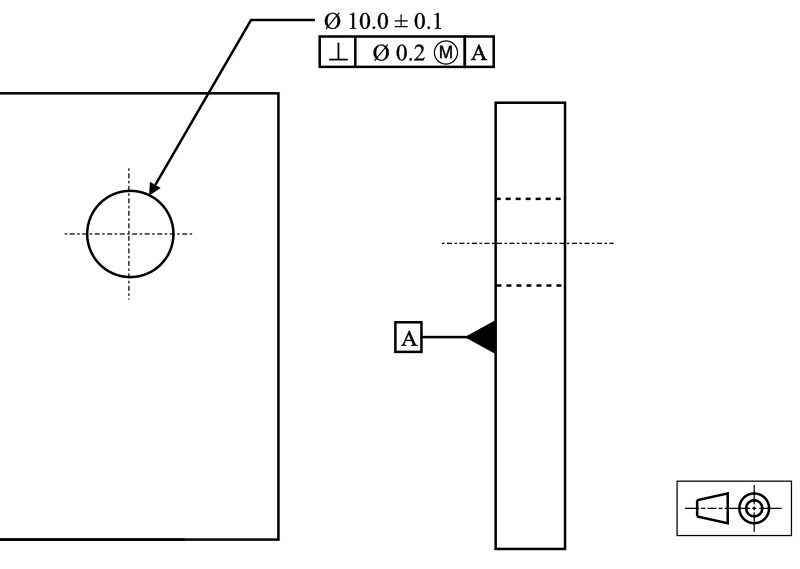
A 3D model tells a machinist what the part looks like. It doesn’t tell them what actually matters. Without a 2D drawing that calls out tolerances, critical dimensions, and GD&T, the quoting team has to guess which features are loose and which ones need a tight tolerance or more setup time. In fact, most of the time, the team ends up assuming every feature has to be tight, just to be on the safer side, and this assumption drastically increases your price for no real reason.
The easiest way to fix this is to send a PDF drawing with the CAD file. Include sizes, tolerances, and all revision information. You don’t need to over-tolerance everything. Highlight what you believe is important, and set the rest at shop tolerances. This alone will make the major difference by getting a quote on the same day, or else having to deal with back-and-forth communication for a week.
Step 3: Specify Material as Grade, Temper, and Form
Specifying ‘Aluminum’ alone isn’t enough because it is not a material spec. There is a difference between 6061-T6 and 7075 that affects machinability, tool wear, strength, and even how the part will perform in service. The same holds for plastics such as PA12, PEEK, and Delrin. All of these machine differently and perform differently under load, so saying ‘plastic’ or ‘nylon’ alone is too broad.
If you know the grade, temper, and form (bar stock, plate, extrusion), provide them immediately. If you don’t know which grade is right for your application, ask about it before you send the RFQ, not after the part has come back in the wrong material. Ignoring this step is not just a delay risk; rather, it’s also a structural risk if the replacement material can’t handle the load the part was designed to carry.
Step 4: Give Real Quantity Tiers, Not a Single Number
Most RFQs say ‘one quantity’ and stop there. Yet the setup cost is a significant factor in CNC pricing, and this cost is spread out differently by volume. If you ask for a quote for 10 units, you may never know what 50 or 500 units would cost, and you’ve likely left real savings on the table unaccounted for.
Offer a few different levels of volume in the RFQ, say 10 / 50 / 500 units, or something similar, so the supplier can figure out the setup-cost curve for you in one go. This is also particularly helpful if you’re not sure of an order quantity yet, as having this pricing will help you make an informed decision.
If you’re working on a project but not sure what quantity you need, our engineers at Premium Parts can discuss the trade-offs with you before you finalise a number.
Step 5: Define Surface Finish and Roughness Numerically
‘Smooth finish’ and ‘as-machined’ mean different things to different shops.
If there is a specific roughness value that you need for your part, such as 3.2 m (125 in), or the surface should be painted with a certain material, then that needs to be written down as a number, not as a description. For example, write roughness as ‘3.2 m (125 in)’, instead of writing ‘the part should feel smooth’.
Don’t skip this step. This not only risks a delay, but also a part that fails inspection after it’s been made. A surface that is too rough could fail a cosmetic check or, worse, a functional fit check where two parts are supposed to fit against each other. Fixing that after the fact costs more time and money than doing it correctly the first time.
Step 6: Lock Down Business Terms Early
The technical file isn’t the only thing that can hold up a quote. Delivery dates, inspection specifications, and shipping terms count too, but are often left out entirely.
Unless you are a supplier, never put up the date ASAP’. The supplier doesn’t have a clue what to do or when, and it usually gets treated as the most expensive, rushed option by default. Give a real date if you have one. Same goes for inspection documentation: if you need a First Article Inspection (FAI) report or CMM measurements, tell them upfront. To find out after the parts are made that you needed inspection documents means you must pay for rework or expedited shipping to make up for lost time, and that’s a loss of cost that you could easily have avoided.
Conclusion
Most CNC RFQ delays aren’t the shop being slow. They’re from missing information that forces the shop to stop and ask before they can begin pricing your part. If you have a CAD file, a real drawing, exact material specs, quantity, a specific finish callout, and clear business terms, they’ll get you through to a much faster and more accurate quote almost every time.
However, if you want a second opinion on your files, Premium Parts can do a quick check of your DFM and flag any discrepancies you may have before they cost you an arm and a leg. You can also direct your RFQ to us, and we’ll get our pricing back to you without any guesswork.
Frequently Asked Questions
How long should a CNC quote actually take if my RFQ is complete?
Most shops can send a quote within a day or two once they have all six items. Without that information, it may take a week or more.
Do I need a full 2D drawing if my CAD model already has dimensions baked in?
Yes, a 3D model shows the geometry, but it doesn’t show which dimensions are critical, or to what tolerance they need to be. A drawing with GD&T removes the guesswork.
What if I don’t know the exact material grade I need yet?
This is a question you would probably ask before filling out your RFQ. If you contact Premium Parts, we can help you determine what grade is best for your part and its load and environment before you send us your RFQ.
Should I always request the tightest tolerances to be safe?
No, over-tolerancing every dimension usually raises cost and machining time without adding real value. Reserve tight tolerances for features that are actually critical to how the part fits or functions, and let the rest sit at standard shop tolerance.